Should you self-host an LLM?
Start with the job, not the GPU. A self-hosted LLM can be useful when you need control of inference, have a task an available model can handle, and can maintain the deployment. Cost savings need a separate calculation. Use these four questions to decide what to validate next. They deliberately separate data control, workload, model quality and operational ownership. A low-volume deployment can still be justified for privacy; a busy one can still fail if the model is unsuitable.
Four questions before a GPU.
Answer all four. This is a planning aid, not a cost or compliance guarantee.
Continue with the trade-offsWhat is a self-hosted LLM?
A self-hosted LLM runs model inference on infrastructure you operate: a workstation, a server or rented compute under your administration. You load the model weights and choose how applications reach the runtime. Hosting your own LLM does not require training a model from scratch. Separate three layers: the model, the serving runtime and the application. A chat UI is an application; it may use local inference or an external API. Local LLM hosting is only local end to end when all relevant processing follows the intended data boundary.
How to self-host an LLM: a small Docker pilot
Begin with one runtime, one small model and one chat interface. Keep the model service on the container network, persist the data and avoid public exposure while you establish that inference works. The example below connects Open WebUI to Ollama by service name. The tabs explain platform differences; they do not turn a CPU compose file into an accelerated deployment. Verify the basic path first, then introduce GPU settings one change at a time. Never use a pilot as proof of production capacity.
Reference path: Docker Engine with Compose. This file runs on CPU. NVIDIA acceleration requires compatible drivers and the NVIDIA Container Toolkit plus a GPU reservation; do not assume that installing a container enables the GPU.
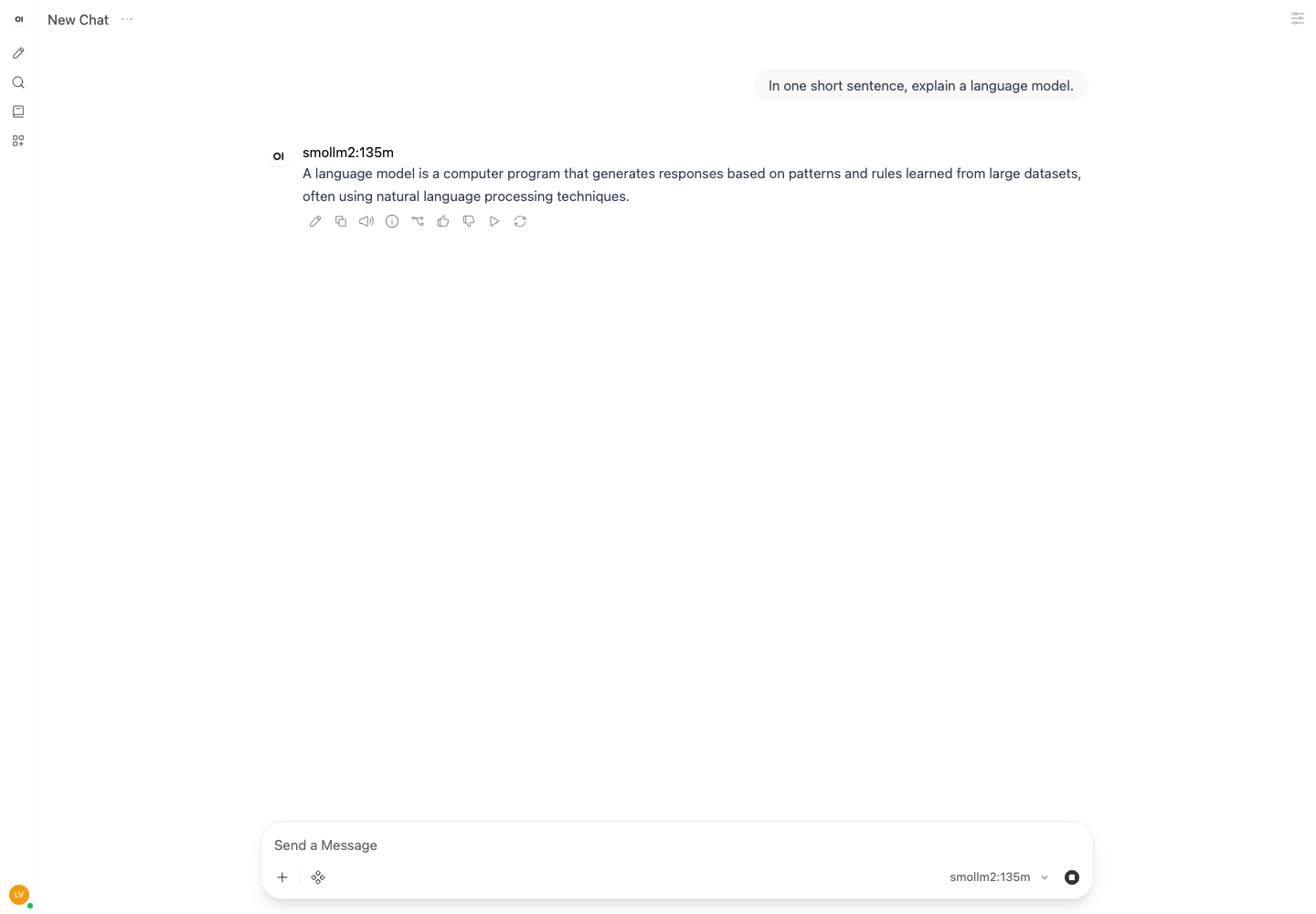
Two-container CPU reference: official documentation reviewed, not yet verified end to end. A separate macOS smoke test used native Ollama 0.34.3 and Docker Open WebUI 0.12.3 on 23 October 2026. It does not establish Linux GPU performance or dedicated VRAM requirements.
Create an isolated project directory
Download the compose file below into this directory. The web interface uses port 3080 so it does not conflict with this website.
mkdir llm-pilot
cd llm-pilot
docker version
docker compose version
Both Docker client and server respond, and Compose prints a version.
Set a persistent application secret
Create the local environment file before starting. Keep it private and retain the same key across container updates.
umask 077
printf "WEBUI_SECRET_KEY=" > .env
openssl rand -hex 32 >> .env
docker compose config --quiet
Compose validates without a missing-secret error. The secret stays in your local .env file.
Start the runtime and load a small test model
The model download needs internet access and disk space. Start with a small evaluation model; this is a connectivity check, not a recommendation that it meets your quality needs.
docker compose up -d
docker compose exec ollama ollama pull llama3.2:1b
docker compose exec ollama ollama run llama3.2:1b "Reply with: ready"
The download completes and inference returns text. Exact wording and speed vary.
Check the UI and record the evidence
Open http://localhost:3080, create your local account, and select the downloaded model. Test with synthetic prompts. Record digests, OS, context and concurrency; container RAM on a Mac is not GPU VRAM. For a model that does not support tool calling, turn off Builtin Tools in Workspace → Models → Edit → Capabilities before testing chat.
docker compose ps
docker compose images
docker compose exec ollama ollama --version
docker compose exec ollama ollama ps
docker stats --no-stream
The UI reaches the model, chat returns text, and you can save the runtime and memory observations.
# Reference CPU-only stack. No model port is exposed to the host.
# Replace image tags with validated digests before production use.
services:
  ollama:
    image: ${OLLAMA_IMAGE:-ollama/ollama:latest}
    volumes:
      - model-data:/root/.ollama
    restart: unless-stopped
  webui:
    image: ${WEBUI_IMAGE:-ghcr.io/open-webui/open-webui:main-slim}
    ports:
      - "127.0.0.1:3080:8080"
    environment:
      OLLAMA_BASE_URL: http://ollama:11434
      WEBUI_SECRET_KEY: ${WEBUI_SECRET_KEY:?Set WEBUI_SECRET_KEY in .env}
    volumes:
      - chat-data:/app/backend/data
    depends_on:
      - ollama
    restart: unless-stopped
volumes:
  model-data:
  chat-data:
Official references: Ollama Docker · Open WebUI Quick Start
Calculate your own costsIs hosting your own LLM actually cheaper?
Compare the same task at the same quality target. Input-heavy retrieval and output-heavy chat have different API bills, so a single blended token price can mislead. Add the infrastructure, maintenance and migration costs you will really pay. An idle reserved GPU still costs money. Useful-time utilization helps explain the cost per completed request; it does not reduce a fixed rental bill. For a stoppable hourly instance, enter actual billable hours, including idle time. The calculator holds a chosen deployment cost fixed and stops treating it as feasible beyond your capacity assumption.
Illustrative assumptions, not live prices. A fixed-capacity comparison assumes comparable task quality. Replace every rate and the capacity estimate with your own quote and load test.
1. Your API workload
2. Your hosting bill
Your current volume: 30,000. Requests to the threshold: 265,455.
Useful time / paid time: 16.7%
No reachable break-even within this capacity, or the API rate is zero. Change the assumptions before drawing a cost conclusion.
See the math and utilization caveat
API = 30 × daily requests × (input tokens × input rate + output tokens × output rate) / 1,000,000. Cache discounts and batch rates are not modeled.
Self-hosted = reserved monthly GPU bill OR hourly rate × billed hours, plus operations and monthly migration amortization. Useful hours do not discount a reserved bill. For hourly billing, include idle-but-billable time; busy hours must not exceed paid hours.
Break-even requests = ceil(monthly hosting cost / API cost per request), valid only within measured capacity. This is a cost crossover, not a repayment date or a claim that the two models are equivalent. A 30-day month is used.
Compare ten monthly request volumes
| Requests / month | API / month | Self-hosted / month | Capacity assumption |
|---|---|---|---|
| 10,000 | $22.00 | $650.00 | Within assumed capacity |
| 50,000 | $110.00 | $650.00 | Within assumed capacity |
| 100,000 | $220.00 | $650.00 | Within assumed capacity |
| 250,000 | $550.00 | — | Resize required |
| 500,000 | $1,100.00 | — | Resize required |
| 1,000,000 | $2,200.00 | — | Resize required |
| 2,500,000 | $5,500.00 | — | Resize required |
| 5,000,000 | $11,000.00 | — | Resize required |
| 10,000,000 | $22,000.00 | — | Resize required |
| 30,000,000 | $66,000.00 | — | Resize required |
Self-hosted LLM hardware: budget beyond the weights
Weight storage is a starting point, not a complete memory requirement. Quantization scales, runtime workspaces, attention implementation, context and concurrent sequences all affect the peak. For mixture-of-experts models, active parameters describe compute rather than the complete set of weights you may need to store. The table is arithmetic, not a hardware recommendation. Add a workload-specific KV-cache estimate and runtime headroom, then measure. Compare the same prompt length, generation length and concurrency when testing two configurations. Unified memory, host RAM and dedicated GPU VRAM are different budgets.
| Parameters | 4-bit | 8-bit | 16-bit |
|---|---|---|---|
| 3B | 1.4 GiB | 2.8 GiB | 5.6 GiB |
| 8B | 3.7 GiB | 7.5 GiB | 14.9 GiB |
| 14B | 6.5 GiB | 13.0 GiB | 26.1 GiB |
| 32B | 14.9 GiB | 29.8 GiB | 59.6 GiB |
| 70B | 32.6 GiB | 65.2 GiB | 130.4 GiB |
Weight GiB = parameters × bits per weight ÷ 8 ÷ 2³⁰. Quantization metadata, runtime buffers and KV cache are additional; a model file fitting in memory is not a performance guarantee.
Draw the data path before adding services
For a single user, a small runtime and UI may be enough. For a team, add explicit identity, access boundaries and observability before increasing the component count. A vector database, an agent framework and a cluster orchestrator each need a reason to exist. Sketch where the prompt, documents, embeddings, logs and model outputs go. Mark external connections and the identity on each hop. An architecture drawing becomes useful when it tells you where to apply a limit, an access check or a deletion policy.
Access boundary
User → authentication → gateway. Keep the inference endpoint private. The local example binds only the UI to loopback.
Model serving
Gateway → runtime → model weights. Set context, concurrency and queue limits from measured demand, not the longest advertised context.
Data and retrieval
Add retrieval only when needed. Enforce document permissions before context reaches the model; preserve deletion and retention policies.
Twelve checks before a deployment goes public
Self-hosting shifts responsibility; it does not create automatic privacy or compliance. Start with a loopback-only pilot. Review each check below before allowing remote use. The commands are inspection aids for this reference stack, not universal proof that a control is effective. Application permissions and recovery behavior require negative tests and a real restore. A green container status cannot establish either.
Check the exposed ports
Only the web interface should be bound to host loopback in this pilot. The model port should not appear in published ports. Verify from another device before any remote rollout.
docker compose psRequire application authentication
Check that an unauthenticated request cannot access chats or model actions. A redirect alone is not a complete authorization test.
curl -I http://127.0.0.1:3080/Keep the application secret stable
Check that the key exists without printing it into a shared log. Secret rotation needs an explicit session and recovery plan.
test -s .env && echo "Environment file exists"Record exact image revisions
Save image digests and review upstream changes before updating. Mutable tags are convenient for a pilot, not a reproducible benchmark.
docker compose imagesInspect runtime listeners
Confirm which processes can listen locally and whether a proxy changes the boundary. On Windows use the corresponding host inspection tools.
lsof -nP -iTCP -sTCP:LISTENSeparate model and chat storage
Confirm persistent volumes are attached. A running container without its expected volume can lose data on replacement.
docker volume ls --filter name=llmReview logs for sensitive content
Inspect locally using synthetic prompts. Redact tokens, user content and identifying metadata before sharing excerpts.
docker compose logs --tail=50Test document authorization
Use two test users with different permissions. A document visible to user A must not be retrievable by user B; a process listing cannot prove this.
# Manual negative test: two users, one restricted documentSet request and queue limits
Check timeout, concurrency and input-length policies at the application gateway. Load-test the intended limits with synthetic data.
docker compose exec ollama ollama psMeasure resource pressure
Observe idle and active runs separately. Container memory is not a GPU VRAM measurement; use device telemetry on GPU hardware.
docker stats --no-streamProve backup and restore
Stop writes or use an application-consistent backup. Restore into a separate project; never test by deleting the original volumes.
# Record backup identifier, isolated restore result and recovery timeCheck remote access and rollback
Keep the local pilot private. Before remote use, test authentication, TLS, firewall rules and rollback from a separate client.
# Manual external check: only intended authenticated entry points respondMeasure a request, then measure a queue
Separate time to first token, generation rate and end-to-end latency. A fast single request does not show how the service behaves when multiple users arrive together. Prefill, decoding, batching and memory pressure can affect different parts of the request. Use a representative prompt set. Keep input and output lengths consistent, record warm and cold behavior, then increase concurrency while watching latency percentiles and error rates. Choose a serving runtime because the measured workload benefits, not because an unrelated benchmark reports a higher tokens-per-second number.
Jump to the deployment referenceOwned hardware, hourly rental or monthly capacity?
Owned hardware brings purchase cost, power, cooling, replacement and administration. Amortize the purchase over an explicit useful life and include the rest of the machine. Do not treat a GPU you already own as free if the question is long-term total cost. Hourly rentals can suit intermittent work only when you can actually stop billing between jobs. Reserved capacity gives a predictable bill but can be expensive at low usage. Managed private deployments trade some operational work for service fees; include the support scope and minimum commitment in the comparison.
Jump to the deployment referenceThe best self-hosted LLM is task-dependent
Build a small evaluation set from the work you need done: extraction, grounded question answering, code edits or another clearly defined task. Define acceptable answers and failure conditions before comparing models. Test license suitability, tool-call behavior and response format as well as language quality. Change one variable at a time. Compare model revision, quantization and prompt format under the same memory and latency budget. Keep the useful baseline even when a newer model appears. A leaderboard can suggest candidates; it cannot replace this evaluation.
What to record after the first successful chat
Record the image digest, model identifier and revision, quantization, operating system, driver, runtime settings and test prompt. Keep context and concurrency beside every memory observation. A screenshot without these details is difficult to reproduce. Test persistence after a normal restart, export a backup and verify a restore in an isolated environment. Capture failed model loads, timeouts and queue saturation. Review upgrades against the same test set and keep a rollback path before changing the running version.
Jump to the deployment referenceWhen you should not self-host an LLM
Pause when no available model meets your task quality, no one can own the service, or the required response time cannot be met within budget. A cheap failed request is not a saving. Small or highly variable workloads may be better served by an API, but there is no universal daily-token cutoff. A privacy requirement can outweigh pure cost. It can also rule out an external fallback. Write down the non-negotiable boundary before making a hybrid design; do not solve a capacity problem by silently sending sensitive requests somewhere else.
Jump to the deployment referenceSelf-hosted LLM vs API vs hybrid
Evaluate quality, data handling, latency, capacity, availability and total cost as separate axes. Self-hosting changes who operates the service; it does not remove resource limits. An API removes much of the infrastructure work, but still needs application monitoring and usage controls. Hybrid routing is useful only with clear rules. Decide which requests may leave your environment, how failures are handled and how costs are attributed. Keep the same evaluation tasks across all three options so the comparison answers your question rather than a vendor headline.
Hosted API
Useful as a quality and cost baseline. Meter input and output separately, account for rate limits and review the provider data policy.
Self-hosted
You choose the runtime, weights and infrastructure. You also own capacity, access control, upgrades, backups and recovery.
Hybrid
Route approved tasks to suitable endpoints. A fallback to an external API must respect the same data boundary as the original request.
Run one pilot. Keep the evidence.
Choose one real task and an explicit data boundary. Complete the decision card, enter your costs, and run a small local pilot. Save the evidence before buying capacity or moving users. If your answer is still unclear, identify the missing fact: task quality, peak concurrency, response time or the actual hosting bill. Measure that next instead of adding more services.
Editorial reference, not a benchmark report. Commands and configuration need validation on your OS and hardware. Cost inputs are illustrative USD assumptions, not provider quotes. No paid infrastructure is provisioned by this page.